
Product overview
What is Pieces?
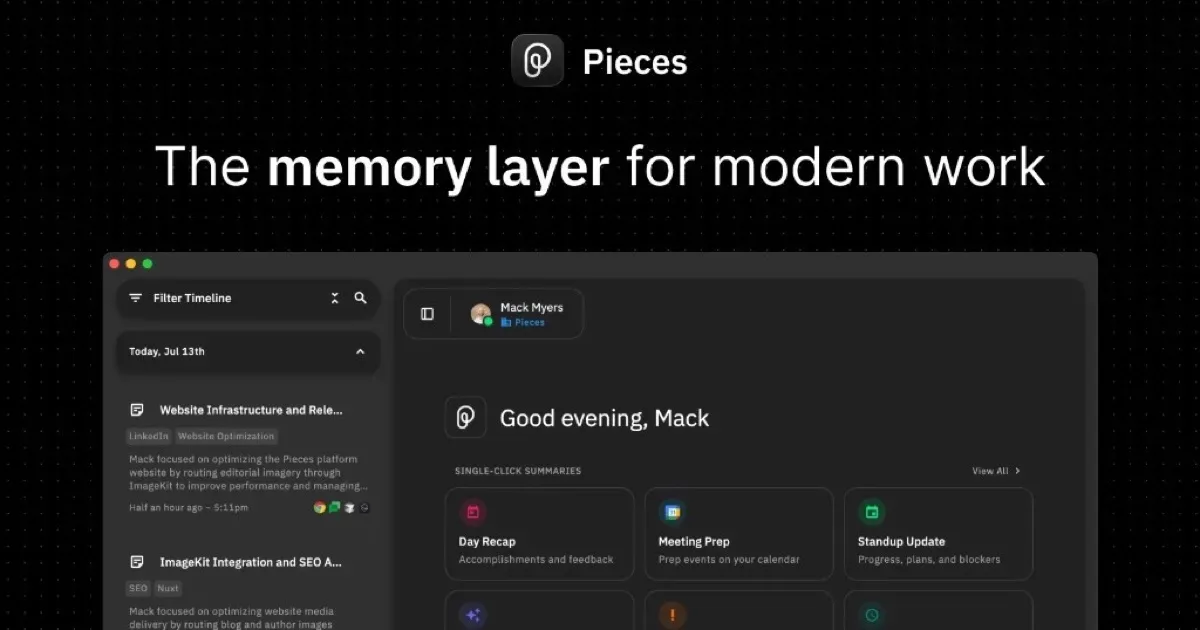
Pieces is an AI memory layer for modern work. It runs in the background on a computer and forms a searchable timeline from activity across research, chats, email, notes, meetings, documents, design work, AI tools, and development environments. The goal is to help users recover earlier context, resume interrupted work, and turn what already happened into useful answers or new material.
The timeline organizes activity chronologically and lets users search or filter by time, source, topic, person, or tool. Pieces can use that context to generate stand-up updates, morning briefs, meeting preparation, day recaps, and other summaries. The website states that memories are saved on the user's device by default and that capture can be paused or disabled for selected apps and websites.
How to Use Pieces
- Download and run Pieces on the computer.
- Allow it to form memories from the apps and sources relevant to the user's work.
- Browse the chronological timeline or search by time, source, topic, person, or tool.
- Ask questions about previous work or generate a brief, update, recap, or meeting preparation document.
- Pause capture, exclude specific sources, or delete selected memory data when needed.
Core Features
- Living timeline: Organizes captured work activity chronologically for later review.
- Contextual search: Finds information by time, source, topic, person, or application.
- AI-generated outputs: Creates updates, briefs, meeting preparation, and recaps from real work context.
- Cross-tool memory: Builds context from communication, browsing, documents, design tools, AI chats, and developer tools.
- On-device storage: Saves memories on the user's machine by default.
- Capture controls: Lets users pause collection, exclude apps or websites, and delete selected data.
Use Cases
- Work resumption: Recover decisions, files, discussions, and research when returning to a task.
- Meeting preparation: Assemble prior conversations, commitments, and account context before a call.
- Status reporting: Generate stand-up updates or day summaries from recent activity.
- Research review: Revisit sources and compare information without repeating searches.
- Development context: Recover code changes, terminal activity, debugging details, and agent work.
Pricing
The website offers a free download for individual users and separately points teams to enterprise options.
Frequently Asked Questions
Where does Pieces store memories?
The website says memories are stored on the user's device by default.
Can users control what Pieces captures?
Yes. Capture can be paused, disabled for selected apps and websites, and deleted by time period, modality, or source.